Features
What each part of the app screen does.
Study screen

Header line
Written/practical and subject, today's solved / today's goal, and total XP in one line.
Deugi's speech bubble
The top line is Deugi's comment; the bottom line shows numbers like subject, accuracy and wrong-answer count. Swipe for more.
Instant grading
Pick an answer and see right/wrong plus the explanation right below the question.
Theory panel
Open the full related theory, separate from the explanation.
Previous · Next
The written-exam footer has only previous and next. Questions to retry are mixed into your queue automatically.
Prescribed queue
One in every three questions is picked from weak theory, frequently-missed subjects or less-practiced subjects.
Practical exam
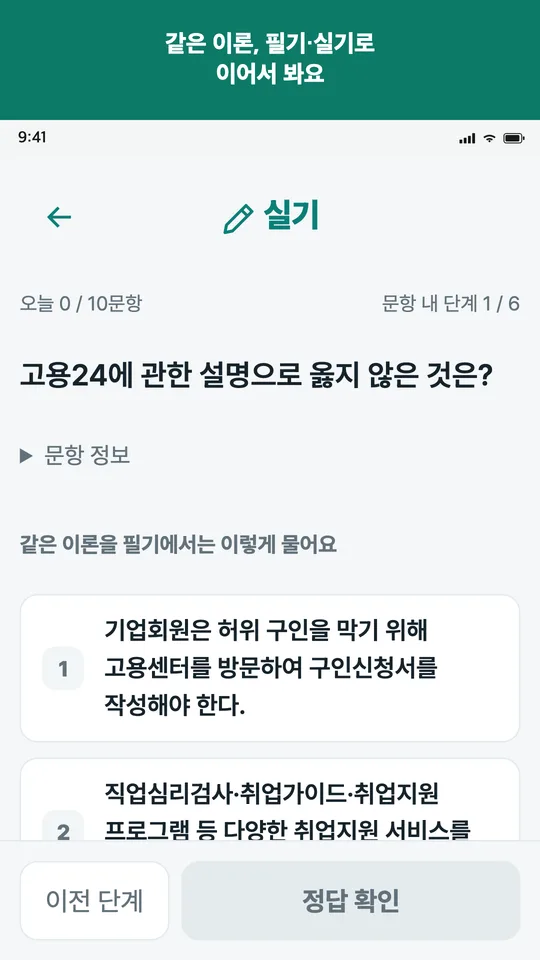
Theory and key answers per question
Review the theory and key answer first, then write your full answer on the next screen.
Per-item scoring
See keyword matches and missing elements for each scoring item.
Mock exams
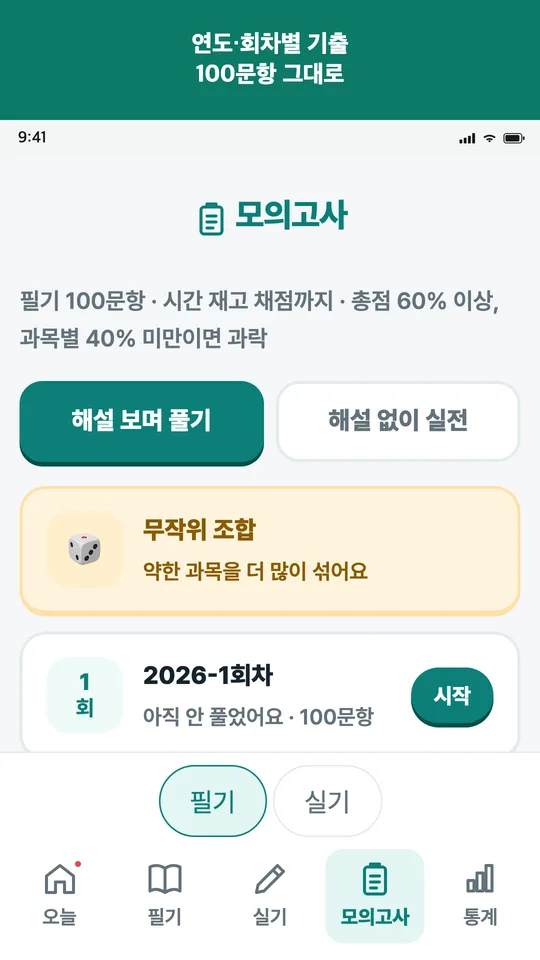
By exam session
Solve a past session in its original order, subjects and question count.
Time and fail line
60-second timer per written question; results check each subject's fail line.
Records and growth

Records
Study trends, items to review and per-subject accuracy in one place.
Deugi grows
Raise your Deugi with gold earned by solving. Its look changes from egg to full maturity.
Achievements · certificates
Reaching goals and keeping streaks earns achievements and certificates.
Trial
After installing, you can try one mock exam and one day of new questions. After the trial, reviewing solved questions and your study records stay open.